









AI magic at full power
There is a saying from a top designer: "For a designer, the tool is
Photoshop. For an art director, the tool is the designer." AI is simply
another tool for work. We have implemented AI in all work processes in
the company, from developing technical documentation and finding
solutions to testing.
Our guys use tools like JetBrains AI, Claude, and ChatGPT to get rid of boring,
repetitive work. Read more here.

AI and Backend Development

Guys spend less time on basic code, and more on smart solutions and real
things. We use AI for task analysis and jointly finding solutions for
complex tasks. It helps check REST API methods when writing API
documentation and during subsequent code testing.
For our guys, AI often becomes a replacement for "Rubber duck debugging",
allowing them to choose the best solution. When developing together with
the team, AI helps consider more options for negative cases and exceptions.
AI and Frontend Development

AI helps the guys reduce routine work, especially when a project has
more than 500 mockups for the desktop version and just as many for the
mobile version. It helps us update large parts of the code at once,
keeping everything consistent and avoiding bugs across the project -
which already saves a lot of time.
It checks that our apps work for everyone and look the same across browsers,
so problems don’t reach the testing stage. And of course, it generates boilerplate
code that used to take hours to write by hand.
AI and QA

According to our regulations, QA work begins even before the first line of code. This includes developing Checklists, Test Cases, and subsequent automation. AI allows us to speed up this process. AI also takes care of the dull parts: preparing code for tests and reading through big documents to find mistakes or rules that don’t match.
AI and Project Management

Managing big technical documents: keeping large documents
up to date used to be very time-consuming. Now, tools like NotebookLM and
Gemini help our PDMs check hundreds of pages for accuracy, saving lots of
effort and letting them focus on leading the team and client’s ideas, not
the “paperwork”.
Saving time: you know how projects generate endless Slack
messages and meeting notes? In the past, PDMs had to go through all of it
manually. Now, AI turns these conversations into short, action-focused summaries.
A 30-minute meeting becomes a clear task list on Trello, fast.
More ideas: with AI, we’re able to quickly run through hundreds
of “what if” ideas. This helps us see possible problems before we even start
building, and validate any decision. That way, we can warn you about risks
sooner - which is truly important.
A small example of efficiency growth
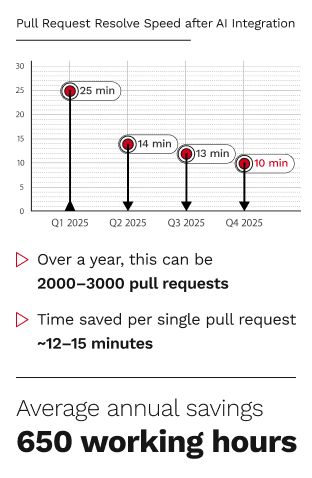
We looked at how AI helps our guys with Pull Requests (PRs) - that’s
when one dev checks another’s code before it becomes part of the
project. On one of our projects, using AI cut the average time needed
for a review from 25 minutes to 13 minutes. This is a 48% improvement. This allowed our client to save 650 hours over the course of a year.
Such small improvements here and there allow us to redirect resources to
solve more complex tasks and work on improving project revenue.

Note
We use AI as a tool, not to make decisions for us. Our team always checks the results, and we never give sensitive data to AI tools.

Why clients stay with us for years
With hands-on experience across more than 30 industries, our team specializes in building management systems and custom digital solutions tailored to complex business operations. We develop solutions around each client’s specific processes, requirements, and long-term goals, from restaurant chains and medical center networks to industrial companies, logistics providers, retail chains, and real estate platforms. Our work also includes training portals, internal platforms, and other business-critical systems designed for real operations, growth, and long-term use.

Company policy
Our company highly values the client’s time, that’s why it is our top priority to complete our work in time while meeting the quality requirements. Web development, as well as many other IT directions, requires a lot of details and nuances to be discussed and fixed. While working with our local clients from